





 Jack Wallen / Elyse Betters Picaro / ZDNET
Follow ZDNET: Add us as a preferred source on Google.
ZDNET’s key takeawaysWellness is a key part of living your best life.It’s not always easy to remember to take breaks.These free, open-source apps help keep stress at bay.
Taking care of your health, wellness, and inner peace is one of the best ways to make it through the day without succumbing to the stress of a busy life. Some days are certainly easier than others, but even on the easy days, you should take care of yourself.
One way to focus on your health is with wellness apps. You might think that Linux doesn’t include such software, but it does. In fact, there are several wellness apps available for Linux, some of which have been around for a long time.
I want to introduce you to my favorite wellness apps designed specifically for the Linux operating system.
Take a deep breath, let it out, and continue reading.
1. Workrave
This app is small but mighty.
Screenshot by Jack Wallen/ZDNET
Workrave’s USP is about protecting you from repetitive strain injuries (RSIs), which the Cleveland Clinic describes as “damage to your muscles, tendons or nerves caused by repetitive motions and constant use.” About 9% of adults in the US reported an RSI across a three-month test period, according to the most recent data from the National Center for Health Statistics.
This app is used for one main purpose: to remind you to take breaks. In our hectic world, it can be easy to forget that your body needs a rest from repetitive motions (such as typing) that can lead to serious problems later on.
Also: The biggest risks lurking inside your at-home DNA and health tests
As someone who has suffered through several RSIs, I promise you that breaks are necessary, and Workrave is a great way to ensure you step away. Workrave can be set up to remind you to take micro breaks (30-second pauses every few minutes), rest breaks (10-minute breaks that encourage you to walk around), daily limits (sets a hard limit on total daily computer usage), and smart monitoring (pauses timers automatically when you leave your computer).
For years, I ignored these types of breaks and wound up with two issues: chronic tendonitis in my right wrist and a ganglion cyst on my thumb. Both conditions were pretty painful at times and would keep me from typing for days. Taking regular breaks has helped to alleviate those issues.
Workrave can be installed from your distribution’s standard repositories and is free to use.
2. CRON-o-Meter
The UI might be outdated, but the app still works great.
Screenshot by Jack Wallen/ZDNET
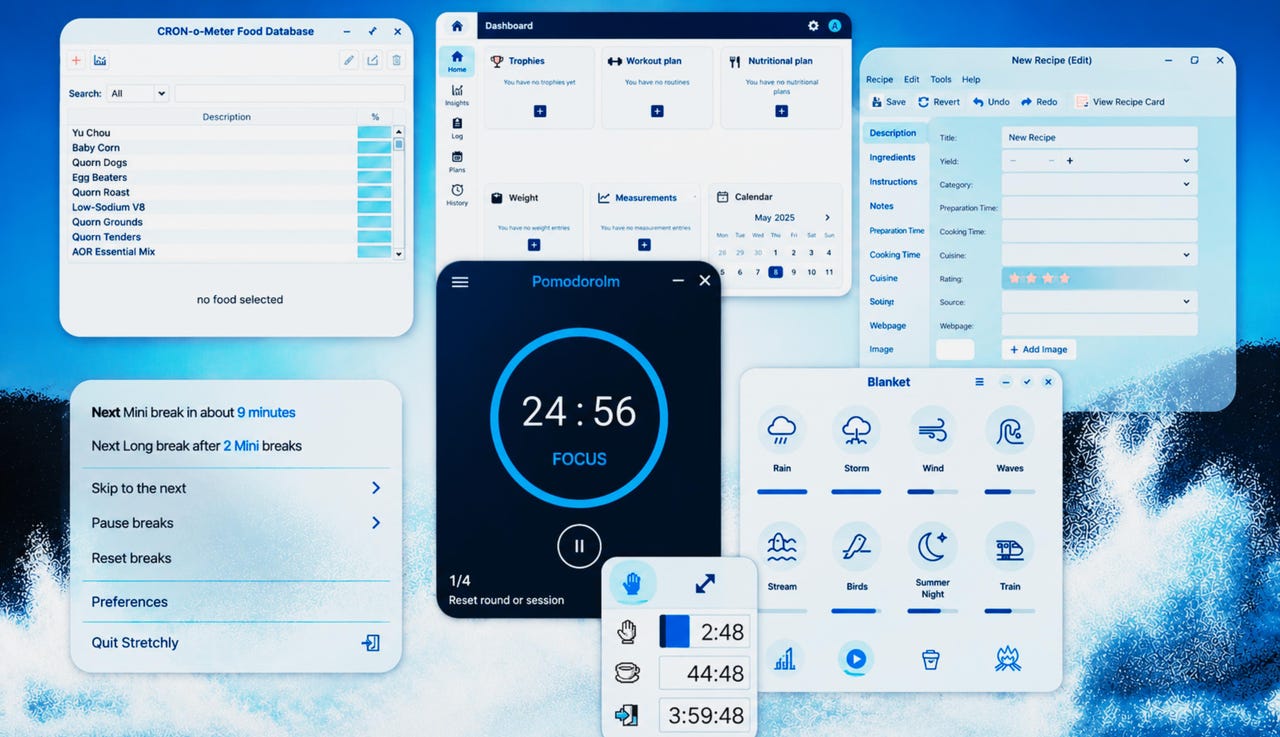
CRON-o-Meter (aka Cronometer) is an app focused on nutrition and health tracking, which provides insights into your diet, exercise, and health. This free app offers comprehensive nutrient tracking, custom food entries, recipes, exercise logs, biometric monitoring of stats like weight, blood pressure, temperature, and detailed reporting. You can also sync between your devices by using third-party services, such as Dropbox.
Also: 7 ways health tech promises to improve your life in 2026
This particular app has morphed into a web-based and mobile app, but the Linux desktop app is still around. The only caveat to using the Linux desktop app is that the UI is outdated. On the desktop, CRON-o-Meter looks like an old-school Java app. Fret not, the app still works well, but if you’d rather opt for a more modern-looking instance, go with the web-based application. Either way, the app is free to use.
On Linux, CRON-o-Meter is free to install from your distribution’s standard repositories.
3. Wger
Wger helps you keep track of your workouts, weight, measurements, and nutrition.
Screenshot by Jack Wallen/ZDNET
Wger is a free, open-source app aimed at your fitness and nutrition. With this app, you can track workouts, diet plans, and even log your body weight. The software has a well-designed UI that makes it easy to use, and you can even install a Wger server on your LAN, so all your information remains “in-house.”
Also: What you give up when you put on a smartwatch or ring
You can modify the Wger dashboard to include only the widgets you want, such as Trophies, Routines, Weight, Measurements, and Calendar. The Wger function I appreciate is the ability to create workout routines. For example, you might be training for a marathon and need to create a routine so you know exactly what mileage you should achieve each week before the event.
The Nutrition Plan feature, meanwhile, is a handy way to track what you eat, allowing you to monitor energy, protein, carbohydrates, fat, fiber, sodium, and more.
4. Pomodorolm
This simple UI makes taking breaks easy.
Screenshot by Jack Wallen/ZDNET
The Pomodoro technique is all about time management. Developed by Francesco Cirillo in the 1980s, the technique boosts your focus. The tool reduces the risk of burnout by segmenting work into 25-minute intervals (called Pomodoros, Italian for tomatoes) separated by short breaks. Pomodorolm is a Pomodoro time tracker that keeps you abreast of the time you’ve spent doing tasks. You can set the app to remind you to focus, take short breaks, take long breaks, and even customize the rounds.
There are custom sounds you can set for each type of break or work session, and you can even rename the different options. For example, instead of Focus, you might use Meditation. There’s also an auto-start feature, built-in themes, a tray icon, an always-on-top option, a mini mode, and even a terminal interface.
Also: How I used Airtable to swap my daily fast-food habit with 5-minute meal planning
If you’re like me, you need to keep track of work sessions and breaks; otherwise, you’ll wind up burned out. Pomodorolm is a great app to help with this concern.
5. Stretchly
You really need to stretch more.
Screenshot by Jack Wallen/ZDNET
Stretchly is exactly what it sounds like: an app to remind you to stretch. Stretching is good for your muscles, keeping them flexible and healthy, which in turn helps you maintain a range of motion in your joints, according to Harvard Health: “Without it, the muscles shorten and become tight. Then, when you call on the muscles for activity, they are unable to extend all the way. That puts you at risk for joint pain, strains, and muscle damage.”
Stretchly aims to keep that kind of damage at bay. The tool lives in your panel (or system tray) and allows you to set regular mini breaks and long breaks. You can configure how long your breaks last and how often you’re reminded to take them. You can even set a strict mode that prevents you from skipping either mini or long breaks.
Also: Wearables produce huge amounts of health data – and doctors are struggling to keep up
The app can be configured to automatically start at login, which I think is a good idea. You don’t want to start your day forgetting to launch the app that will remind you to take those crucial breaks.
Speaking of which, Stretchly doesn’t glaze over those breaks. When the timer goes off, you need to get out of your chair, stretch, and (when the timer goes off to remind you that the break is over) sit back down.
Over the years, I’ve learned how important stretch breaks are. I take them regularly. What’s more, I never skip breaks or feel guilty about taking them.
6. Gourmand
If you’re serious about your diet, Gourmand can help.
Screenshot by Jack Wallen/ZDNET
Gourmand is a recipe app. You type in or import recipes from web pages, text files, or MealMaster, and/or MasterCook, including a description, ingredients, instructions, and notes. Once you’ve created a recipe, you can select it from the main window and click Add to Shopping list, which will then ask you how many servings, and automatically calculate the amounts you need. Print the shopping list and head to the store.
I’ve used Gourmand to help me bake vegan pumpkin chocolate chip bread. The app made it much easier to export my shopping list as a PDF and share it with my Android phone, so I could go to the grocery store without forgetting an ingredient.
There’s also a recipe card view, images, formatting, search, and even the ability to search using regular expressions.
7. Blanket
Blanket is my go-to ambient noise app.
Screenshot by Jack Wallen/ZDNET
This app is special to me because ambient sounds do a great job of keeping me relaxed and focused. I’ve covered Blanket before, saying that my favorite aspect is the ability to customize the mix of sounds.
You can select from rain, storm, wind, waves, stream, birds, summer night, train, boat, city, coffee shop, fireplace, pink noise, and white noise. You can select any or all sounds you want to include and even add your own sounds.
You can also adjust the total volume level or the volume of each sound and even save your custom mixes as a preset.
Some studies suggest that listening to nature sounds can actually relieve stress. So, if you have trouble relaxing, Blanket should be a must. This free app keeps me at peace, especially when things can get hectic. Besides, who doesn’t love the sound of a good thunderstorm?